

AI-ready invoice data is invoice content that has been parsed, labeled, and structured into discrete named fields, typically as JSON, so that downstream systems, LLMs, or automation workflows can consume it without any additional cleaning or interpretation. Invoscope produces this structured output automatically from any invoice PDF, scan, or image, reaching 99.2% field-level accuracy in roughly 5 seconds per document, with no template setup required.
Why Raw OCR Text Is Not Enough for AI Pipelines
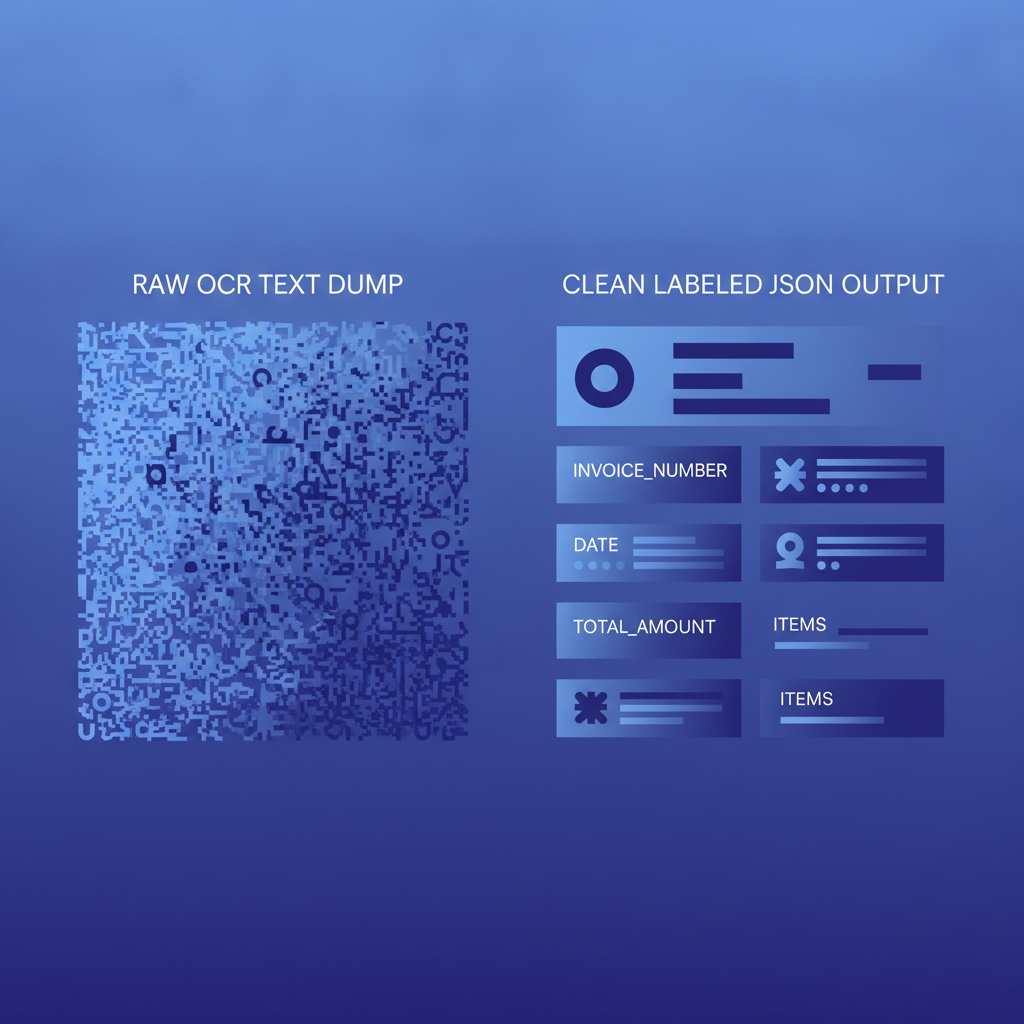
A lot of teams assume that running a PDF through a basic OCR engine gives them something usable. What they get is a long string of characters extracted in reading order, with no concept of which number is the invoice total, which string is the vendor name, or which rows belong to a line-item table. Feeding that text directly into an LLM or a workflow tool forces the model to infer structure every single time, introducing inconsistency that compounds across thousands of documents.
The problem gets worse with format variation. A freight carrier's invoice looks nothing like a software subscription invoice or a construction subcontractor's billing sheet. When structure has to be inferred from raw text, even a small layout change can break field mapping entirely. Clean JSON eliminates that brittleness by making the structure explicit before any downstream system touches the data.
For a deeper look at how AI-native extraction differs from legacy OCR at the technical level, see How AI Invoice Extraction Works: No-Template Setup Explained.
What Clean Invoice JSON Actually Looks Like
Good structured invoice output is flat enough to be readable but rich enough to cover every field a finance or automation team needs. Below is a representative example of what Invoscope returns for a standard invoice.
{
  "invoice_number": "INV-2024-00847",
  "invoice_date": "2024-11-15",
  "due_date": "2024-12-15",
  "vendor": {
    "name": "Apex Supply Co.",
    "address": "142 Industrial Way, Austin TX 78701",
    "tax_id": "82-4471029"
  },
  "bill_to": {
    "name": "Ridgeline Manufacturing LLC",
    "address": "900 Commerce Blvd, Denver CO 80203"
  },
  "currency": "USD",
  "line_items": [
    {
      "description": "Steel Bracket 4x6 (Grade A)",
      "quantity": 200,
      "unit_price": 4.75,
      "line_total": 950.00
    },
    {
      "description": "Shipping and Handling",
      "quantity": 1,
      "unit_price": 85.00,
      "line_total": 85.00
    }
  ],
  "subtotal": 1035.00,
  "tax_rate": 0.0825,
  "tax_amount": 85.39,
  "total_due": 1120.39,
  "payment_terms": "Net 30",
  "po_number": "PO-78234"
}
Every field is named, typed, and positioned correctly. A downstream n8n node, a Python script, or an LLM prompt can reference line_items[0].unit_price with confidence, because the structure is deterministic across every invoice Invoscope processes, regardless of the source layout.
Field-Level Accuracy: Why It Matters More Than Document-Level Accuracy
A tool can claim 95% document accuracy while silently misreading the tax amount on every other invoice. Document-level accuracy just means the file was processed without crashing. Field-level accuracy means each individual value, vendor name, total, line-item description, tax ID, was extracted correctly.
For AI pipelines and automation, field-level accuracy is the only metric that matters. A single wrong digit in total_due corrupts a payment run. A misread po_number breaks a 3-way matching workflow. Invoscope's published 99.2% accuracy benchmark is measured at the field level, not the document level, which is why the distinction appears explicitly on the accuracy benchmark page.
Invoscope's Structured Output vs. Raw OCR: A Direct Comparison
| Capability | Raw OCR Text | Invoscope JSON Output |
|---|---|---|
| Field labeling | None, text in reading order | Every field named and typed |
| Line-item tables | Collapsed to flat text, columns lost | Nested array with quantity, unit price, total per row |
| Date formatting | Whatever the invoice printed | ISO 8601 (YYYY-MM-DD) normalized |
| Currency and numbers | String with symbols, commas vary | Numeric types, currency code separate |
| Multi-format handling | Requires template per layout | No-template AI adapts to any layout |
| Processing speed | Varies, often requires post-processing | About 5 seconds per invoice |
| Accuracy (field-level) | Typically 70-85% without templates | 99.2% across tested invoice formats |
| Direct API access | Depends on tool | Yes, via public API with JSON response |
The Two Modes That Shape Your JSON Output
Invoscope offers two extraction modes, and the right choice depends on your volume and workflow pattern.
Quick Analyze
Quick Analyze is designed for single invoices or ad-hoc extraction. Upload a PDF, get structured JSON back in about 5 seconds. This is ideal for developers testing an integration, finance staff handling a one-off vendor, or anyone who needs clean data from a single document without setting up a project. The JSON output is available for download immediately and also accessible via the API response body.
Smart Projects
Smart Projects handles batch volumes. You group invoices into a project, Invoscope processes them in parallel, and you receive a single consolidated export. For API consumers building pipelines, Smart Projects lets you push hundreds of invoices through a single workflow run and retrieve all structured JSON in one response, which maps cleanly to tools like n8n or Make.
Getting JSON into Your Automation Pipeline
The most direct integration path is the Invoscope public API, which was released as a stable endpoint and documented in the public API and API keys changelog entry. A POST request with the invoice file returns a JSON body matching the schema shown above. From there, the structured output slots into any workflow tool without transformation.
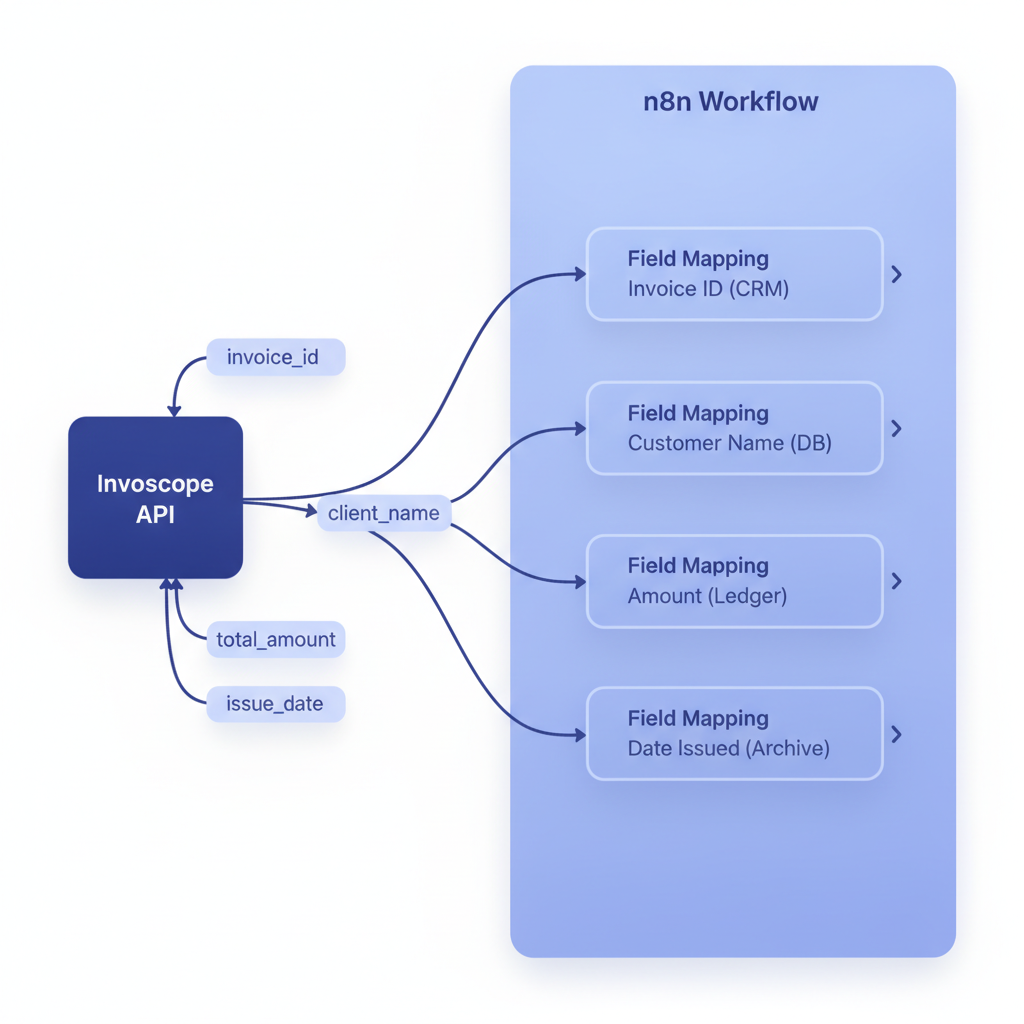
For teams using n8n specifically, the workflow pattern is straightforward: an HTTP Request node posts the invoice to the Invoscope API, a subsequent Set node maps fields like invoice_number, total_due, and line_items to your target system's schema, and downstream nodes push data into a database, ERP, or spreadsheet. The n8n Invoice Data Extraction Workflow guide walks through this setup end to end, including authentication and error handling for failed extractions.
Feeding Invoice JSON into LLM Pipelines
Finance teams experimenting with LLM-based reasoning, anomaly detection, or GL coding suggestions face a specific problem: models perform significantly better when invoice data arrives as structured JSON rather than raw text. Structured input means the model spends its context window on reasoning, not on parsing layout ambiguity.
A practical pattern is to extract with Invoscope first, then pass the resulting JSON as the data payload in a system prompt. The model receives clean, typed fields and can apply rules like "flag any invoice where tax_rate exceeds 0.10" or "suggest a GL code based on line_items[].description" with far greater consistency than it could from unstructured text.
This also ties directly to downstream workflows like GL coding invoices, where field-level accuracy in the extracted data determines whether automated code suggestions are reliable enough to use without manual review.
What JSON Export Covers in Invoscope
The JSON and CSV export feature, available across all plans including the free tier, covers the following field groups from every extraction.
| Field Group | Example Fields |
|---|---|
| Document metadata | invoice_number, invoice_date, due_date, payment_terms |
| Vendor information | vendor.name, vendor.address, vendor.tax_id, vendor.email |
| Buyer information | bill_to.name, bill_to.address, bill_to.contact |
| Line items (array) | description, quantity, unit_price, line_total, product_code |
| Totals and tax | subtotal, tax_rate, tax_amount, discount, total_due |
| Reference numbers | po_number, order_reference, project_code |
| Currency | currency (ISO 4217 code), currency_symbol |
The JSON and CSV export capability is detailed in the CSV and JSON export changelog entry, which covers format options and plan availability.
Pricing for API and Structured Output Access
The free tier gives you 10 invoices per month with no credit card required, and JSON export is included. For higher volumes, paid plans start at $9.99 per month. API key access is available on paid plans, which is what you need for automated pipeline ingestion. Full pricing details, including the per-plan API access tiers, are on the pricing page.
For context on how Invoscope's extraction approach fits into the broader landscape of methods, see the Invoice Data Extraction: Methods, Tools and Best Practices pillar, which covers the full spectrum from manual entry to AI-native structured output.
Common Mistakes That Break Downstream JSON Consumption
Even with clean extraction, a few integration patterns create problems worth avoiding.
The first is treating total_due as a string. If your extraction tool returns numbers as strings like "1120.39" instead of the numeric type 1120.39, every downstream calculation requires a type cast. Invoscope normalizes numeric fields to proper number types in the JSON response.
The second is inconsistent date formats. An invoice printed in Europe might show 15.11.2024 while one from the US shows 11/15/24. Without normalization, date comparisons and due-date logic fail silently. Invoscope normalizes all dates to ISO 8601 regardless of source format.
The third is missing line-item arrays on simple invoices. Some invoices have no line-item table, just a single total. A well-formed JSON schema should still return an empty array for line_items rather than omitting the key entirely, so your consuming code does not need a null check on every document. Invoscope always returns a consistent schema.
Start Extracting Structured Invoice JSON Today
Clean, field-accurate JSON from every invoice you process is not a future capability. It is available now, on the free tier, with no template setup and no credit card. Process your first 10 invoices at no cost and see the structured output your automation pipeline will receive.
Create a free Invoscope account and get AI-ready invoice JSON from your first upload.
Related reading: What Is an Invoice Number? Format, Sequence, and Why It Matters
Related reading: Types of Invoices Explained: Commercial, Proforma, Credit Note, Recurring, and More