

Invoice automation for logistics companies means using AI to extract structured data from carrier invoices, such as those issued by FedEx, UPS, DHL, or regional freight brokers, and delivering that data as clean, reconcilable rows in Excel or CSV without manual re-keying. Invoscope does this in roughly 5 seconds per invoice at 99.2% extraction accuracy, with no template setup and no ERP required.
Why Carrier Invoices Are Harder Than Most
A typical accounts payable team handles invoices from dozens of vendors. Logistics operations are different. A mid-size shipper can receive hundreds of carrier invoices every week, and each carrier formats its bills differently. FedEx itemizes fuel surcharges, residential delivery fees, and dimensional weight adjustments across multi-page PDFs. UPS bundles shipment-level detail inside summary headers that vary by service tier. DHL Express invoices often arrive in mixed-language layouts if cross-border routes are involved.
Add regional carriers, third-party logistics providers, and freight brokers, and the format variety becomes genuinely unmanageable by hand. Each invoice format demands its own mental template, and a single misread surcharge line can mean paying twice or disputing a charge weeks after the fact.
The result is a slow, error-prone process that delays cost allocation, hides freight spend analytics, and keeps finance teams in reactive mode rather than planning ahead.

What Logistics Teams Actually Need From Invoice Extraction
Before choosing any tool, it helps to be precise about the job. Logistics companies typically need three things from carrier invoice data:
- Line-item capture: base freight charge, fuel surcharge, residential fee, dimensional weight adjustment, and any accessorial charges, all as separate rows.
- Carrier-level consistency: the same fields appearing in the same column positions, invoice after invoice, so reconciliation queries run reliably.
- Speed at volume: a batch of 50 to 200 invoices processed before the accounts payable cutoff, not the next morning.
Invoscope addresses all three through its two extraction modes: Quick Analyze for one-off invoices and Smart Projects for recurring carrier batches. For logistics workflows, Smart Projects is the relevant mode.
One Smart Project Per Carrier: How It Works
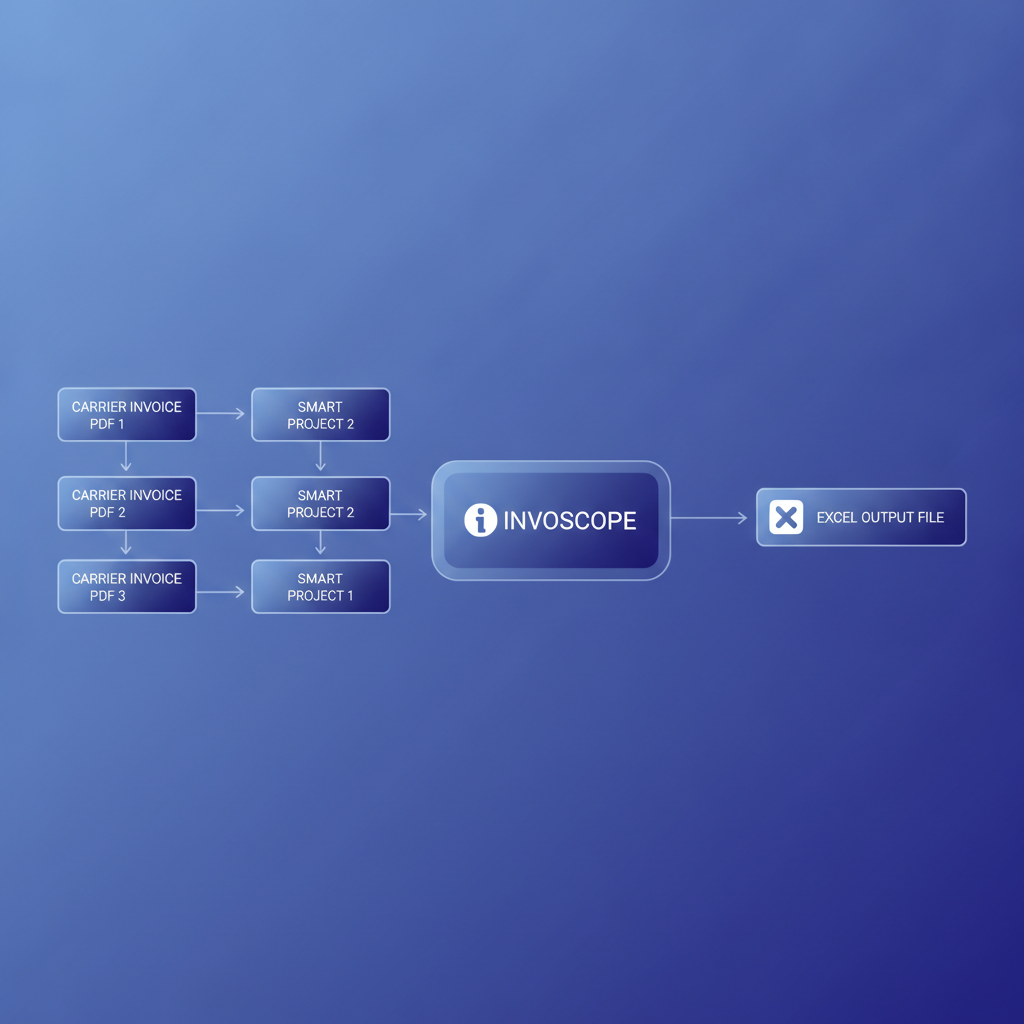
Smart Projects let you create a named project tied to a specific document type or source. For a logistics company, the natural setup is one project per carrier: a FedEx project, a UPS project, a DHL project, and so on.
Each time a batch of carrier invoices arrives, you drop them into the relevant project. Invoscope processes each file using Google Gemini-powered extraction, identifies the fields present in that carrier's format, and outputs a single consolidated Excel file with every invoice's line items aligned to common columns. There is no template to configure and no field-mapping wizard to revisit every time the carrier updates its PDF layout.
At 5 seconds per invoice, a batch of 100 FedEx invoices takes under 10 minutes to process, including the time to download the output. Compared to a human entering the same batch at a realistic rate of 5 to 8 minutes per multi-line carrier invoice, that is roughly 8 to 13 hours of data entry eliminated in a single run.
The broader context of how this fits into a full automation strategy is covered in the complete guide to automating invoice processing, but the carrier-specific pattern is worth detailing here.
FedEx, UPS, and DHL: Format Differences and What Gets Extracted
The table below summarizes the typical fields present in each major carrier's invoice format and how Invoscope handles them. These are not guaranteed field lists from the carriers themselves; actual invoice content varies by account type and service agreement. The point is to illustrate format diversity and extraction coverage.
| Carrier | Common Invoice Fields | Format Notes | Invoscope Output |
|---|---|---|---|
| FedEx | Tracking number, service type, base charge, fuel surcharge, residential surcharge, dimensional weight charge, total | Multi-page PDFs; shipment detail on later pages; summary on page 1 | All line items extracted to rows; shipment-level and summary fields separated |
| UPS | Shipment reference, service level, published rate, discount, fuel surcharge, accessorial fees, net charge | Hierarchical layout with group headers; some fields nested under account summary | Header context preserved; each charge line extracted with parent reference |
| DHL Express | Waybill number, origin/destination, weight, freight charge, fuel surcharge, remote area surcharge, tax, total | May include non-English labels on cross-border invoices; column order varies by region | AI reads layout rather than fixed positions; fields matched by context regardless of column order |
| Regional/Freight Brokers | Varies widely; often includes PRO number, origin/destination city, weight class, linehaul, fuel, accessorials | No standard format; some use scanned paper bills | No-template AI handles novel layouts; scanned PDFs supported |
Reconciliation: Where the Real Time Savings Appear
Extracting data is only half the story. The goal in logistics is reconciliation: comparing what a carrier billed against what your shipping system expected, catching duplicate charges, and flagging invoices where the fuel surcharge percentage differs from the rate agreement.
When carrier invoices live as PDFs in an email inbox, none of that analysis is practical. When they exist as structured Excel rows, every comparison becomes a VLOOKUP or a pivot table. Finance teams at logistics companies consistently report that the reconciliation step, not the extraction step, is where hours disappear. Getting clean data out of PDFs fast is the prerequisite for everything downstream.
For a detailed look at what manual processing actually costs before automation, the analysis of manual invoice processing costs breaks down the per-invoice economics with 2026 data.
Invoscope Is Not a TMS or an AP Platform
This is worth stating clearly. Invoscope does not approve invoices, post to a general ledger, integrate natively with a transportation management system, or automate payment runs. It is a single-purpose extraction tool: PDF carrier invoices go in, structured data comes out.
That scope is intentional. Many logistics companies already have accounting software, a TMS, or even a basic spreadsheet workflow for payment approval. What they lack is clean structured data to feed those systems. Invoscope fills that gap without requiring a platform migration or a lengthy implementation project.
If your team uses QuickBooks, Xero, or another accounting tool, the extracted Excel or CSV output from Invoscope imports directly. The guide to integrating invoice extraction with accounting software covers common import workflows for those tools.
Pricing and Getting Started
Invoscope offers a free tier of 10 invoices per month with no credit card required, which is enough to process a small carrier batch or test the output format before committing. Paid plans start at $9.99 per month. The pricing page shows current plan limits and batch caps.
For logistics teams processing hundreds of invoices weekly, the relevant question is how many invoices per month the operation requires and whether the Smart Projects feature (available on paid plans) fits the carrier-per-project workflow described above. The features overview details what each plan includes.
| Tier | Monthly Invoices | Smart Projects | Price |
|---|---|---|---|
| Free | 10 | No | $0, no credit card |
| Starter | More than free tier | Yes | From $9.99/month |
| Higher tiers | High volume | Yes, multiple projects | See pricing page |
A Practical Setup for a Logistics Finance Team
Here is a straightforward starting point for a team processing invoices from three carriers:
- Create three Smart Projects in Invoscope, one named for each carrier.
- At the end of each week, download carrier invoice PDFs from each carrier's billing portal or email attachments.
- Upload each batch to its corresponding project. Processing completes in minutes.
- Download the consolidated Excel output per project.
- Run your existing reconciliation logic (VLOOKUP, Power Query, or a simple filter) against the structured data.
- Import the verified data into your accounting or TMS system.
No template maintenance. No per-carrier configuration to revisit when a carrier updates its invoice layout. The AI reads the document context each time, so format changes are handled without manual intervention.
Common Questions From Logistics Teams
What happens when a carrier changes its invoice format?
Because Invoscope uses no fixed templates, a layout change on the carrier's end does not break extraction. The AI reads the document structure each time rather than matching against a saved field map. You may see a new column appear in your output if the carrier adds a new charge type, but existing fields continue to extract correctly.
Can Invoscope handle scanned paper freight bills?
Yes. Scanned PDFs and image-based invoices are supported. Extraction accuracy on clean scans is comparable to native PDFs. Very low-resolution or heavily skewed scans may produce lower confidence on specific fields, but standard carrier-quality scans process reliably.
Does Invoscope extract line items or just header data?
Both. Line items, including individual surcharge rows, are captured in full alongside header fields such as invoice number, date, and carrier account number. This is essential for logistics reconciliation where surcharge breakdown matters as much as the invoice total.
Is there an API for automated ingestion?
Yes. Invoscope provides a public API, which allows logistics teams to push invoice files programmatically and receive structured JSON or CSV output without manual upload steps. This suits teams building automated pipelines from carrier email parsing or TMS document storage.
Start Extracting Carrier Invoices Today
If your logistics finance team spends more than a few hours each week entering carrier invoice data by hand, the math on automation is straightforward. At 5 seconds per invoice and 99.2% accuracy, Invoscope handles the extraction so your team can focus on the reconciliation and analysis that actually requires human judgment.
You can process your first 10 invoices free, no credit card needed, and see exactly what the output looks like for your carrier formats before committing to a plan.
Create your free Invoscope account and start extracting carrier invoices today.
Related reading: Accounts Payable Automation for Agencies: Managing Multi-Client Invoice Volumes
Related reading: Invoice Processing for Construction Businesses: Managing Subcontractor and Supplier Invoices