
Manual invoice data entry is one of the most persistent bottlenecks in modern finance operations. Despite the availability of automation tools, a large portion of businesses — particularly small and mid-sized companies — still rely on employees to manually transcribe data from PDF invoices into spreadsheets, accounting systems, or ERPs.
The question finance managers ask more and more often is: at what point does manual entry stop making sense? This article gives you an honest, numbers-driven comparison between the manual approach and AI-powered invoice extraction — including real cost data, error rates, and the hidden productivity tax that rarely makes it into any budget line.
If you're evaluating whether to automate your invoice workflow, this breakdown is exactly what you need.
The Real Cost of Manual Invoice Data Entry
Most finance teams underestimate what manual invoice processing actually costs. The visible cost is labor time. The invisible costs — errors, rework, delayed payments, and strained vendor relationships — often exceed the visible labor cost by 2x to 3x.
Industry benchmarks put the all-in cost of manually processing a single invoice between $12 and $15. This figure accounts for:
- Typing time: A typical invoice takes 3–8 minutes to key in manually, depending on complexity and field count.
- Verification: Cross-checking entered data against the original document adds another 2–4 minutes per invoice.
- Error correction: Industry data suggests 1–3% of manually entered records contain errors. Correcting each one downstream — after it has propagated to a report, payment run, or supplier account — adds significant time.
- Approval routing delays: Manual workflows often require re-entry into multiple systems. Each handoff creates lag.
For a business processing 200 invoices per month, that's $2,400 to $3,000 in monthly processing cost — just for data entry. At 1,000 invoices per month, you're looking at $12,000 to $15,000 monthly, or $144,000–$180,000 per year. These numbers make it immediately clear why accounts payable automation has become one of the highest-ROI investments in back-office operations.
Where Manual Entry Breaks Down: The Error Problem
Speed is one dimension of the problem. Accuracy is another — and arguably the more damaging one.
Manual data entry errors in invoice processing cause downstream consequences that compound over time:
- Duplicate payments: The same invoice processed twice due to inconsistent entry or naming conventions.
- Wrong amounts posted: A transposed digit in a line-item amount can throw off budget reports and trigger audit flags.
- Incorrect vendor matching: Manual entry with slightly different vendor name formatting creates ghost records in your supplier database.
- Late payment penalties: Errors caught late in the approval cycle push payments past due dates, resulting in penalty fees or damaged vendor relationships.
Studies from APQC (Association of Process and Quality Improvement) consistently show that organizations with manual invoice processing have 3x to 5x higher error rates than those using automated extraction. The cost of correcting a single payment error, once routed through an ERP correction workflow, typically exceeds the original data entry cost by a significant margin.
How Invoscope Eliminates Manual Entry
Invoscope is an AI-powered invoice data extraction platform that converts PDF invoices to structured Excel data in approximately 5 seconds — with 99.2% extraction accuracy, backed by our verified accuracy data.
The platform offers two primary extraction modes:
Quick Analyze is built for ad-hoc extraction. Upload a PDF invoice and receive a complete structured dataset — vendor name, invoice number, date, line items, subtotals, tax, and total — formatted and ready to paste into your accounting system or Excel workflow. No training required. No template setup. Works immediately on first use.
Smart Projects is designed for recurring workflows. Create a project for each invoice format or vendor, let the AI learn the field layout once, and from that point forward every invoice from that supplier is processed in a single batch. For teams handling 100+ invoices per month from the same set of vendors, Smart Projects eliminates the entire data entry workload.
Both modes produce output directly in Excel — no export configuration, no reformatting. The file is ready to use.
Side-by-Side Comparison: Manual Entry vs. Invoscope
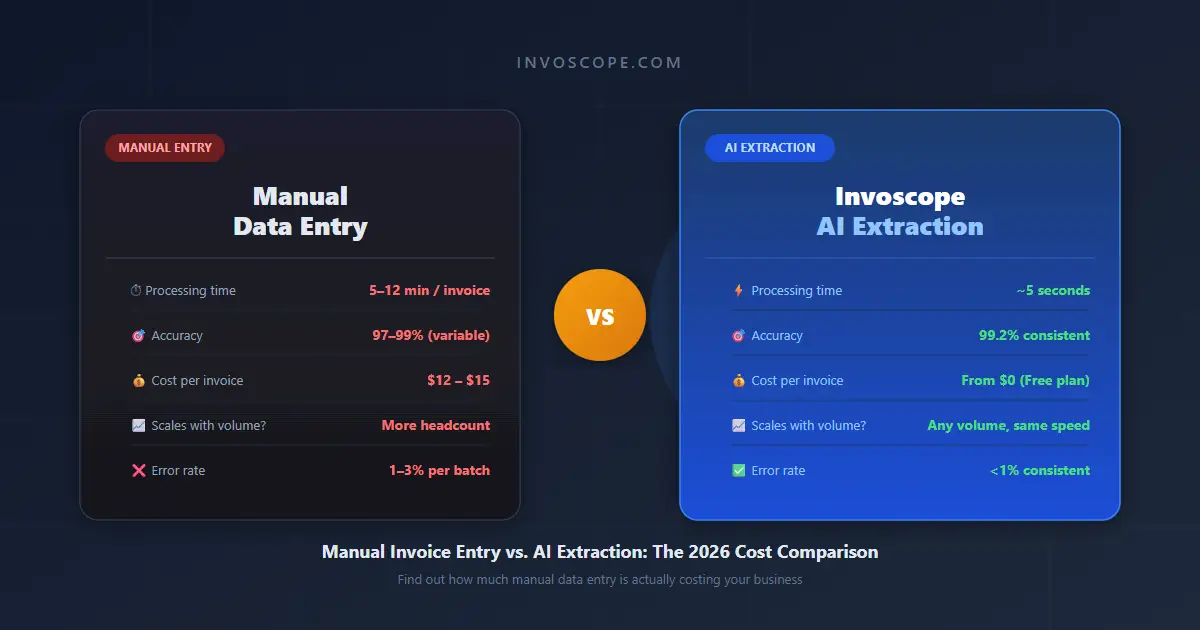
| Factor | Manual Data Entry | Invoscope AI |
|---|---|---|
| Processing time per invoice | 5–12 minutes | ~5 seconds |
| Accuracy rate | 97–99% (human variability) | 99.2% consistent |
| Cost per invoice | $12–$15 | From $0 (Free plan) |
| Output format | Whatever you manually build | Structured Excel, every time |
| Scales with volume | Requires more headcount | Handles 1 or 10,000 invoices |
| Error rate | 1–3% (compounds over time) | <1% consistent |
| Vendor format flexibility | Works on any invoice | Works on any PDF format |
| Setup required | None (just time) | None for Quick Analyze; one-time template for Smart Projects |
| Staff dependency | High (sick days, turnover risk) | None |
The Hidden Productivity Tax of Manual Entry
Beyond the direct cost per invoice, manual data entry carries a productivity tax that most finance managers intuitively recognize but rarely quantify.
When an accounts payable clerk spends 4 hours per day entering invoice data, those 4 hours are completely unavailable for value-generating work: vendor analysis, cash flow forecasting, spend optimization, or early payment discount identification. Over a year, this represents approximately 1,000 hours of analyst capacity consumed by transcription.
Invoscope recaptures that capacity. Processing 200 invoices with Invoscope takes under 20 minutes of active time (reviewing extracted data). The same volume takes roughly 25 hours manually. That's a 98% reduction in time spent on pure data entry — time that can be redirected to work that actually improves financial outcomes.
Cost Scenario: 100 Invoices Per Month
Let's make this concrete with a specific scenario that reflects a typical SMB accounts payable load.
A company processing 100 invoices per month with a single AP clerk earning $25/hour:
- Manual entry time: ~10 hours/month (6 min average per invoice)
- Error correction time: ~2 hours/month (1.5% error rate × correction overhead)
- Total monthly labor cost: ~$300 (12 hours × $25/hr)
- Annual labor cost: $3,600 — plus overhead, benefits, and management time
With Invoscope's Starter plan at $9.99/month for 100 invoices:
- Monthly cost: $9.99
- Annual cost: $119.88
- Annual savings vs. manual: ~$3,480 on labor alone — before factoring in error reduction and recaptured analyst time
The ROI at this volume is not marginal. It's transformative. And it scales: at 1,000 invoices per month, the Invoscope Pro plan at $49.99/month replaces what would cost $12,000–$15,000 annually in manual processing labor.
When Manual Entry Still Has a Place
Intellectual honesty demands acknowledging that manual entry is not always wrong. There are specific scenarios where the overhead of an automation tool doesn't justify itself:
- Very low volume: If your business processes fewer than 10 invoices per month and each is from the same vendor with an identical format, manual entry may be faster to start than setting up any system. Invoscope's free plan includes 10 invoices/month — which eliminates even this scenario as a barrier.
- Highly irregular invoices: Invoices with non-standard layouts, handwritten annotations, or embedded tables sometimes require human judgment to interpret. In these cases, a hybrid approach — AI extraction plus human review — is usually the right answer.
- One-time projects: If you're processing a specific historical invoice set for an audit or reconciliation project, a one-time batch through Invoscope is more efficient than building a recurring workflow.
In all other recurring scenarios, the time and cost arithmetic consistently favors automation.
How to Transition Away from Manual Invoice Processing
If you work in a practice, our guide to invoice processing for accountants and bookkeepers covers the multi-client workflow in detail.
Switching from manual entry to automated extraction does not require a large migration project. The practical transition looks like this:
Step 1: Start with your highest-volume invoice source. Identify the vendor or invoice type that accounts for the most entries per month.
Step 2: Create a free Invoscope account and run 3–5 invoices through Quick Analyze. Verify that the extracted fields match what you need.
Step 3: For recurring vendors, create a Smart Project. Upload a sample invoice, confirm the field mapping, and your template is ready for future batches.
Step 4: Expand to additional vendors and invoice types. Most teams complete the transition for their top 10 vendors within a single week.
Step 5: Repurpose the recovered time. Redirect AP staff from data entry to data analysis — vendor spend reports, payment timing optimization, and supplier relationship management.
The transition is incremental, reversible, and risk-free. There is no minimum commitment, no integration requirement, and no IT project. Invoscope works entirely within your existing Excel-based workflow — it simply removes the manual extraction step.
Conclusion: The Numbers Don't Lie
The case for replacing manual invoice data entry with AI-powered extraction is not philosophical — it's arithmetic. At virtually every invoice volume above 10 per month, automated extraction costs less, produces more accurate output, and frees up staff capacity for higher-value work.
Manual entry made sense when there was no scalable alternative. That's no longer the case. AI invoice extraction at 99.2% accuracy, processing in approximately 5 seconds per invoice, is available at a cost that pays for itself within the first month for most businesses.
The only remaining question is how many invoices you'll continue to enter manually before switching.
For a full side-by-side breakdown, see our Manual Data Entry vs. Invoscope comparison page — built specifically for finance teams evaluating the switch.
No credit card required. No setup. Cancel anytime.